> For the complete documentation index, see [llms.txt](https://growi-finance.gitbook.io/hf-docs/llms.txt). Markdown versions of documentation pages are available by appending `.md` to page URLs; this page is available as [Markdown](https://growi-finance.gitbook.io/hf-docs/how-to-invest-in-growi.hf/1o-convert-fiat-into-usdc/how-to-create-a-metamask-wallet/how-to-buy-usdc-from-metamask.md).
# How to buy USDC from MetaMask
How to buy your first cryptocurrencies.
Using MetaMask to buy crypto is not the cheapest way, however, it is the easiest and the most private (no KYC).
This is a guide about how to add funds to MetaMask. However, if you want to explore other methods to buy cryptocurrencies you can look at this [article](https://medium.com/@growi.fi/comparison-of-the-main-methods-of-buying-cryptocurrencies-e305d52c2a2d) where we explain the pros and cons of the main ways.
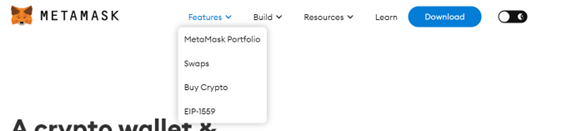
1. First of all, go to MetaMask via your browser icon. Or go to and select MetaMask Portfolio.
2. To continue with, put yourself on the buy side and select your country and your fiat currency. Then choose the cryptocurrency you want to buy and the payment method.
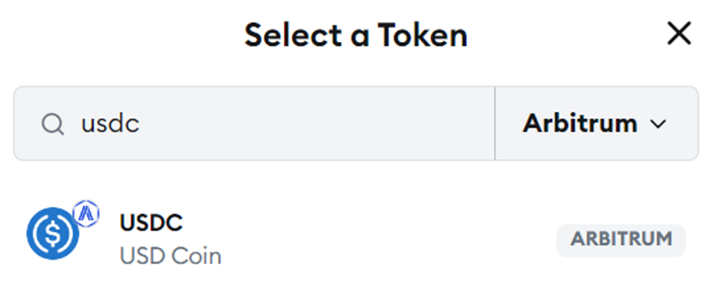
3. Growi.HF works in the **Arbitrum One** blockchain, and initially, we only accept **USDC.** Therefore, the cryptocurrency you have to buy is USDC from the Arbitrum One blockchain.
4. Finally, follow the instructions from the payment provider you have chosen